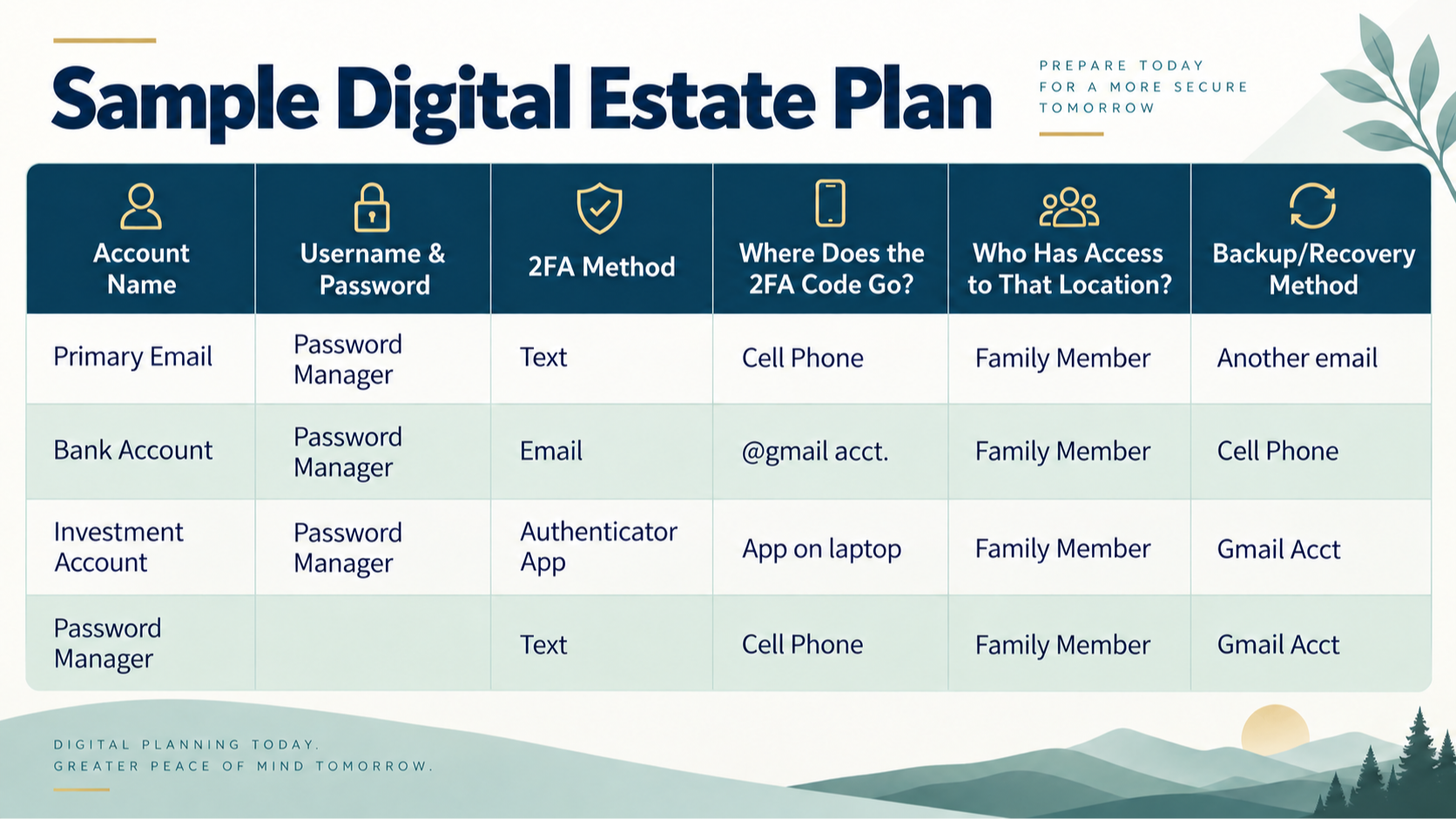
You have done everything right. You created an estate plan, organized your important documents, and even took the extra step of securely storing your usernames and passwords so your family won’t have to search for them when needed. However, there is one problem that many people don’t think about: a username and password may not be enough.
Imagine your family needs access to an important account. They have the username. They have the password. Then the account asks for a six-digit security code.
The code is being sent to your phone.
Or it is going to an authentication app on a device your family cannot access.
Or the only backup code is stored somewhere no one knows about.
Suddenly, your family has the right information but still cannot get in.
YOUR DIGITAL ESTATE IS MORE THAN YOUR PASSWORDS
Today, so much of our lives exist online. Our bank accounts, brokerage accounts, email, photographs, documents, cloud storage, subscriptions, and social media are all stored digitally. Your estate plan should address more than just where to find your passwords. It should also explain how your accounts are protected and how your loved ones can access them when necessary. One of the main things to consider is two-factor authentication, often called 2FA.
Two-factor authentication (2FA) is an extra layer of security that requires two forms of verification to access an account. It has become the standard security measure for most online accounts. If a 2FA verification code is sent to a phone number, email address, or authentication app that only you can access, those carefully documented usernames and passwords may not be enough. As part of your digital estate plan, consider documenting:
• Which accounts use 2FA.
• Where each account sends its verification codes.
• Which phone number or email address is connected to the account.
• Whether an authentication app is being used.
• Where backup or recovery codes are stored.
• Which devices are needed to access important accounts.
• Who is authorized to manage your digital accounts.
• Which accounts offer a Legacy Contact or recovery contact.
It is also important to identify Legacy Contacts and recovery contacts wherever they are available. These tools allow you to designate someone who can help manage, recover, or access an account after your death or prolonged inactivity. Setting these up while you are alive can help prevent your family from being locked out of important photographs, documents, communications, financial information, and other digital assets. For example, Apple allows users to designate a Legacy Contact, which will allow access to the data stored in your Apple account, including photos, messages, notes, files, backups, and more. It does not, however, give access to passwords and passkeys.
A digital estate is ultimately about more than passwords. It is a clear roadmap for your family, helping reduce the anxiety and frustration that can come with navigating an increasingly complex digital world during an already difficult time. Review your accounts regularly; your devices will change, your passwords will change, your accounts will change. Your plan should change with them.